VB.NET Developer's Guide

Teaches Visual Basic programmers all about Microsoft s .NET platform, and how to develop applications using the new Visual Basic.NET.
 TABLE OF CONTENTS
 Menus hold commands grouped by a common topic. Menus make it easy for your users to navigate your application as they see menus they have already used in Windows, such as the File menu. As an added benefit, using a menu to hold commands avoids using precious real estate on your forms. Let s look at creating menus.
You can add menus to a form using the MainMenu control. Menus are often added to a form at design time. You can use the new Menu Designer in Visual Basic .NET to add menus to your forms at design time.
In this exercise, you will add a File menu with an Exit menu item to a form at design time:
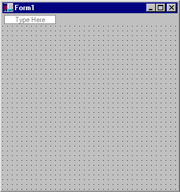
Figure 7.11: The Menu Designer
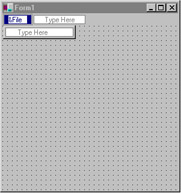
Figure 7.12: The File Menu