Windows Server 2003 Security Infrastructures

This nuts and bolts guide is a must-read for anyone wants to know about Windows Server 2003 security and leverage the operating systems' security infrastructure.
 TABLE OF CONTENTS
 The Windows Server 2003 Account Policies [Part of the Group Policy Object (GPO) computer configuration] include a special subfolder for Kerberos-related policy settings (illustrated in Figure 5.34). It contains the following GPO entries:
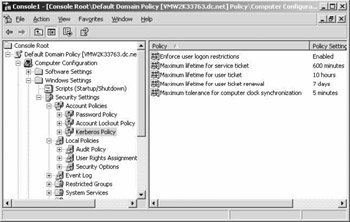
Enforce user logon restrictions: This setting enforces the KDC to check the validity of a user account every time a ticket request is submitted. If a user does not have the right to log on locally or if his or her account has been disabled, he or she will not get a ticket. By default, the setting is on.
Maximum lifetime for service ticket : In Microsoft terminology, a service ticket is a plain Kerberos ticket. Its default lifetime is 10 hours.
Maximum lifetime for user ticket : In Microsoft terminology, a user ticket is a Kerberos TGT. Its default lifetime is 10 hours.
Maximum lifetime for user ticket renewal : By default, the same ticket [service or user ticket (TGT)] can be renewed up until 7 days after its issuance. After 7 days, a brand-new ticket has to be issued.
Maximum tolerance for computer clock synchronization: This is the maximum time skew that can be tolerated between a ticket s time- stamp and the current time at the KDC. Kerberos is using a time- stamp to protect against replay attacks. Setting this setting too high creates a bigger risk for replay attacks. The default setting is 5 minutes.
These Kerberos policies can only...