Windows Server 2003 Security Infrastructures

This nuts and bolts guide is a must-read for anyone wants to know about Windows Server 2003 security and leverage the operating systems' security infrastructure.
 TABLE OF CONTENTS
 Now that we have explained the basic Kerberos protocol, we can discuss some real-world Windows Kerberos logon examples. In this section we will look in detail at both local and network logon features in single and multiple domain environments and in a multiple forest scenario.
Typical examples of logon method in a single domain environment are:
Alice is logging on from a machine that is a member of the domain where Alice s user account has been defined (this is a local logon method).
Alice accesses a resource located on a machine that is a member of Alice s logon domain (this is a network logon method).
Figure 5.11 shows what happens during a local logon process in a single domain environment.
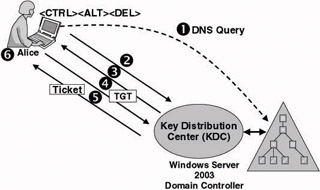
Everything starts when Alice presses and chooses to log on to the domain.
The client Kerberos package acting on behalf of Alice tries to locate a KDC service for the domain; it does so by querying the DNS service. [10] The Kerberos package will retry up to three times to contact a KDC. At first it waits 10 seconds for a reply; on each retry it waits an additional 10 seconds. In most cases a KDC service for the domain is already known. The discovery of a domain controller is also a part of the secure channel...








