Windows Server 2003 Security Infrastructures

This nuts and bolts guide is a must-read for anyone wants to know about Windows Server 2003 security and leverage the operating systems' security infrastructure.
 TABLE OF CONTENTS
 In the previous chapters we explained some of the technical nuts and bolts of Windows Server 2003 PKI. In this chapter, we look at the different steps you need to consider when planning, designing, and building a Windowsrooted PKI.
Like any other IT project, a PKI project can be split into four key phases: assessment, design, implementation, and management (administration and maintenance). The phases are illustrated in Figure 16.1. A PKI project can be iterative: During the implementation phase, for example, issues may arise that require a new assessment and changes to the original design.
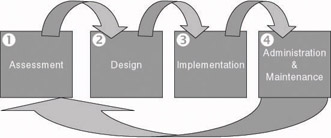
During the assessment phase, the current and future security requirements of an organization are analyzed. This can be done by running a security audit, performing a penetration test, or just analyzing existing processes. The assessment phase also includes a business requirement analysis.
The design phase deals with the technological and nontechnological design of the PKI solution. Nontechnological design topics include the creation of certificate policies and certification practice statements (CPS).
The implementation phase takes care of the rollout of the PKI solution, its integration with the existing IT environment, and, before the rollout, the development of customized PKI-enabled applications (PKA) or PKI software plug-ins.
Once the PKI is installed and deployed across your enterprise, you must manage and maintain it. In the management phase, you must set up the support model for the PKI (Helpdesk), PKI administrator, and user training...