Hack Proofing Linux: A Guide to Open Source Security

Excellent detailed introduction to key Linux security tools and
techniques, for non-system administrators.
 TABLE OF CONTENTS
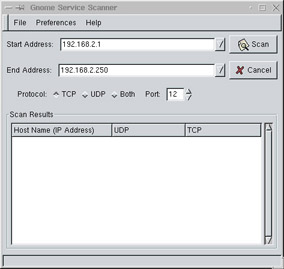
 Gnome Service Scan (GSS) is a simple port scanner. It is quite fast, and has a GUI interface. It is also easy to install, and uses the same libraries as the Gnome (that is, Ximian) desktop. The main GserviceScan window is shown in Figure 3.10.
You can download the source code for GSS at www.gnome.org/applist/view.php3?name=Gnome%20Service%20Scanner. The Preferences section, shown in Figure 3.11, allows you to further customize GSS.
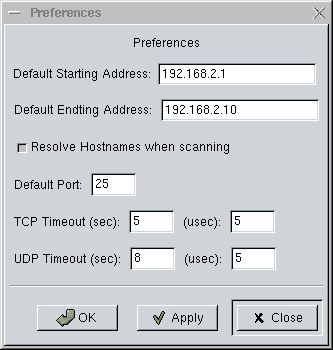
Setting longer TCP and UDP timeout values may ensure that you obtain results that are more accurate. Longer timeout values, however, mean longer, more time-consuming scans, so strike a balance. A good idea would be a default of 7 and 10 seconds for the TCP and UPD timeout values, respectively. In addition, if your network is experiencing DNS problems, you can disable DNS so that you at least learn the IP address and the open ports of the remote host.
To install GserviceScan, you must have the Gnome desktop installed, complete with all packages from the www.gnome.org site. If you don t have Gnome installed, log on to your Linux system and issue the following command:
lynx -source http://go-gnome.com/ sh. <a name="284"></a><a name="beginpage.8EEBEA4B-1F1D-47B0-8605-05B8AE919D91"></a>
Of course, you can install the appropriate RPMs from the Red Hat distribution CDs. However, if you install Gnome from the Gnome site, the latest Gnome updates and features become available to you.
This command...