Hack Proofing Linux: A Guide to Open Source Security

Excellent detailed introduction to key Linux security tools and
techniques, for non-system administrators.
 TABLE OF CONTENTS
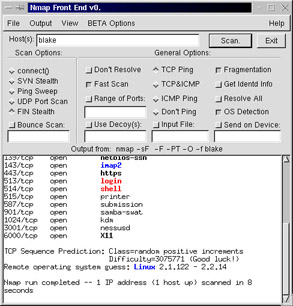
 You are not limited to a command-line interface. The Nmap Front End (NmapFE) provides a well-written, stable GUI that allows you to control almost every aspect of Nmap. You can download NmapFE at www.insecure.org. It is available in both a tarball and an RPM (the RPM is available on the CD accompanying this book: nmap-frontend-0.2.53-1.i386.rpm). As with Nmap, the latter works best in Red Hat systems. Figure 3.15 shows the NmapFE interface after it has issued a FIN Stealth scan, in fast mode, using only a TCP ping that has been fragmented.
| Note | You should note, however, that this interface is somewhat unstable, and given to faults that lead to complete crashes (core dumps). This is especially the case in systems that have been upgraded (say, from Red Hat version 7.0 to 7.1). It is possible that upgrades create conflicts in some of the supporting libraries. |