Hack Proofing Windows 2000 Server
Addresses concerns one might have about network security and how to protect your network environment.
 TABLE OF CONTENTS
 One of the weaknesses in Windows NT 4.0 is inherent in the default access permissions assigned to the built-in groups for the file system and the Registry. Windows 2000 alleviates that weakness by refining the permissions granted to these groups.
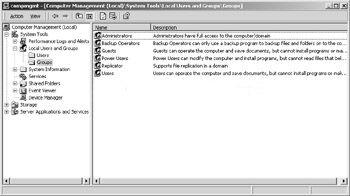
Windows 2000 Server is a member server or standalone server when it is first installed on a clean system. If the server participates in a domain, it is a member server, but if it is in a workgroup, it is a standalone server. Active Directory is not automatically installed during a fresh installation of a system, because the setup program does not know whether you want the device to be a member server or a domain controller. However, Windows 2000 Server does automatically create the following groups when it is first installed:
Administrators
Backup Operators
Guests
Power Users
Replicator
Users
These groups are found in the Groups folder under Local Computer Users and Groups in the Computer Management console. Figure 2.1 demonstrates Local Users and Groups. These same groups, with the exception of Power Users, are also present if the system is promoted to domain controller; however, additional groups are added as built-in local groups. The additional groups are:
Account Operators
Print Operators
Server Operators
These groups, as well as the others, are found in the Builtin folder of your directory tree in the Active Directory Users and Computers console. Figure 2.2 demonstrates Active Directory...