Hack Proofing Windows 2000 Server
Addresses concerns one might have about network security and how to protect your network environment.
 TABLE OF CONTENTS
 A process is created every time a program runs. A process includes a set of resources available to the process, an address space for the process, and a set of threads that run under the process s context. A thread runs program instructions and is the smallest unit of a process. In order to secure your servers, you need to know what processes are running. You need to be able to view processes remotely. You also need to be able to stop processes that shouldn t be running. The Support Tools provide you with the following tools to help manage your processes:
Process Viewer
Task List Viewer
Task Killing utility
The Windows 2000 Server Resource Kit provides with the following process management tools:
Process Tree
PuList
Process Viewer is a graphical tool that shows the processes and their threads running on your computer. You can use Process Viewer to change the priority of the processes and the threads. You can use Process Viewer to kill any processes running on your computer and to view the amount of memory being used by any given process. The only file needed to run Process Viewer is pviewer.exe. Figure 12.34 shows the Process Viewer interface. Table 12.7 describes the components of Process Viewer.
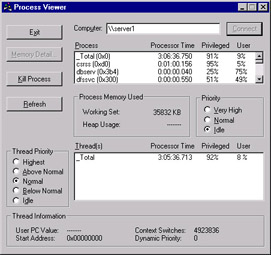
| Component | Description |
|---|---|
| Exit button | Closes the Process Viewer application. |
| Connect button | Connects to the machine listed in the Computer... |