Hack Proofing Windows 2000 Server
Addresses concerns one might have about network security and how to protect your network environment.
 TABLE OF CONTENTS
 You can find the Support Tools on the Windows 2000 Server CD. Installing the Support Tools gives you 48 new tools. We won t be discussing all 48 here, however. For a complete discussion of all of the tools, please see Deploying Windows 2000 with Support Tools by Syngress Publishing (ISBN 1-928994-12-1). Exercise 12.1 walks you through the installation of the Support Tools.
Insert the Windows 2000 Server CD.
Browse to the Support\Tools directory.
Double-click on setup.exe. This will start the installation wizard and give you the window shown in Figure 12.1.
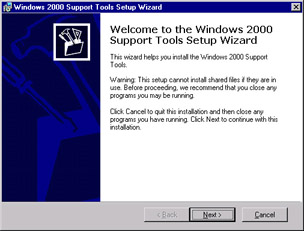
Figure 12.1: The Welcome Window for the Windows 2000 Support Tools Setup Wizard
Click on Next to get the User Information window shown in Figure 12.2. Microsoft recommends that you close all other programs before you continue the installation.
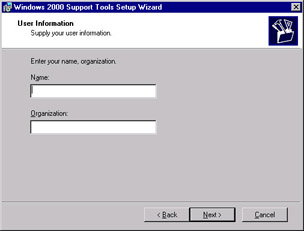
Figure 12.2: The User Information Window
Enter in the user s name and organization. This is an optional requirement. If you leave this blank and click on Next, installation will continue. Click Next to continue to the next window, shown in Figure 12.3.
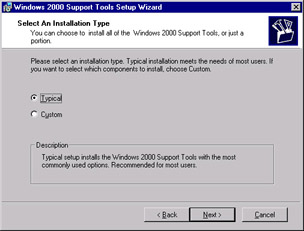
Figure 12.3: Selecting an Installation Type
Choose Typical or Custom and click Next. Typical installs what Microsoft considers to be the most common options. Typical installs to C:\Program Files\Support Tools. Custom installation allows you to choose where to install the Support Tools. For this exercise, you will be performing a custom installation.
If you choose a custom installation, you will...