Google Talking

Creating Your Own Theme

As we discussed in Chapter 4, the Google Talk client includes a wide variety of colorful themes that can be applied to your individual chat windows. The process is fairly technical and requires that you have a basic understanding of Hypertext Markup Language (HTML) and cascading style sheets (CSS), two fundamental technologies used to create modern Web sites.

The expected page-count of this book won t support a discussion of HTML and CSS, but we will attempt to walk through the files and explain what the fields mean and how to edit them. Editing the themes inside Google Talk involve simply editing text documents, so there is no need for specialized tools or software. Windows notepad will prove capable enough for all of the work we ll be doing.

Creating the Necessary Files

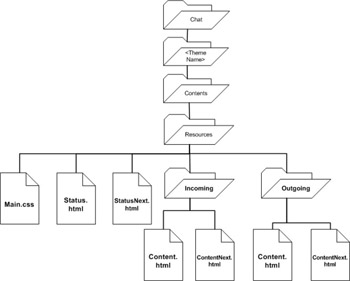
To implement a new theme, there are a number of required files that control how the theme is laid out and applied. Although these files can be generated from scratch, it will be easier to use an existing theme as a template and copy over its files. The base files needed are shown in Figure 5.13. This branch of directories is located off your C:\Documents and Settings\\ Local Settings\Application Data\Google\Google Talk\themes\user\ directory. So, the Main.css file for a theme named PHP would be located at C:\Documents and Settings\\LocalSettings\ApplicationData\Google\GoogleTalk\themes\user\chat\PHP\Contents\Resources\Main.css.


Figure 5.13: Base Files for a New Theme

The expected page-count of this book won t support a discussion of HTML and CSS, but we will...

UNLIMITED FREE
ACCESS
TO THE WORLD'S BEST IDEAS

SUBMIT
Already a GlobalSpec user? Log in.

This is embarrasing...

An error occurred while processing the form. Please try again in a few minutes.

Customize Your GlobalSpec Experience

Category: Content Management Software
Finish!
Privacy Policy

This is embarrasing...

An error occurred while processing the form. Please try again in a few minutes.