Google Talking

Chapter 6: Proxy Use

Introduction

Many companies allow Internet access only when clients first connect through a proxy server. In this chapter we discuss proxy servers and explain how Google Talk can be configured to connect through them.

What Are Proxies?

What are proxies, and why do we need them? To figure that out, you first need to understand how communication occurs between computers on the Internet. For example, when connecting to a Web server such as http://googletalk.blogspot.com, your Web browser will connect directly to the site, request the Web page, and display it on your screen. When the Web server wants to send information back to you, it does so directly to your computer, based on your computer s IP address.

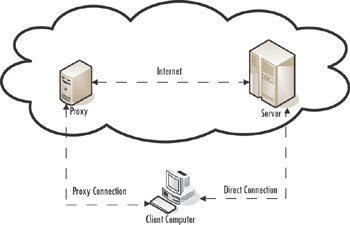
A proxy is a server that stands between you and another machine that you are communicating with. If you connect to blogspot.com through a proxy server, the proxy server accepts your request, connects to the target server, and retrieves the Web page for you. After retrieving all the data, it then sends a copy to your Web browser for you to view on your screen. When working through a proxy, you never make any direct connection to the server that is holding your data; instead, the proxy makes the connections for you, as shown in Figure 6.1.


Figure 6.1: Communicating With a Proxy

Why Use Proxies?

So proxy servers allow us to send our data through another machine. Why is this so important, and why should we be interested in the prospect? Proxies...

UNLIMITED FREE
ACCESS
TO THE WORLD'S BEST IDEAS

SUBMIT
Already a GlobalSpec user? Log in.

This is embarrasing...

An error occurred while processing the form. Please try again in a few minutes.

Customize Your GlobalSpec Experience

Category: Network Servers
Finish!
Privacy Policy

This is embarrasing...

An error occurred while processing the form. Please try again in a few minutes.