Microsoft Outlook Programming: Jumpstart for Administrators, Power Users, and Developers

Unleash the power of MS Outlook to cutomize and use macros and templates for programs like Excel and Word, and more.
 TABLE OF CONTENTS
 Visual Basic for Applications (or VBA as I'll call it from now on) is the programming environment where you will write and test macros and procedures that respond to various events that occur when you use Outlook. VBA was added to Outlook 2000, although other Office applications have had it for some time. If you have an older version of Outlook, you can still use VBA in other Office applications to perform some of the automation tasks you'll learn about in this book.
The highlights of this chapter include discussions of the following:
How to start and end a VBA session
What the basic windows in VBA are used for
Where to enter program code
How to add a new form
How to avoid a security message when you start VBA
How to determine where Outlook saves your VBA projects
The default VBA security setting in Outlook 2002 or in Outlook 2000 with the Service Pack 2 or the Outlook Email Security Update does not allow you to run VBA code. Therefore, before starting VBA, you should check the security settings by choosing Tools, Macro, Security. If the setting on the Security dialog (see Figure 2.1) is High, set it to Medium, then restart Outlook.
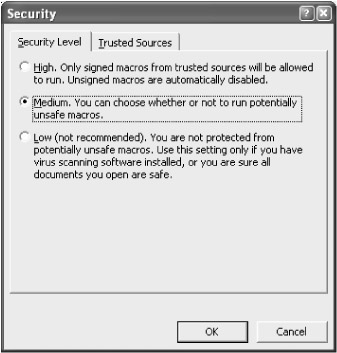
With security set to Medium, once you write some VBA code, Outlook will...