How to Cheat at Configuring VmWare ESX Server

VMware VirtualCenter is the management application used to administer and configure both ESX servers, and the virtual machines.
VMware VirtualCenter manages the entire ESX server farm. From within the VirtualCenter console you can do the following:
Server templates are deployed from this console for rapid deployment of virtual machines. Templates are stored server configurations that are used to deploy consistent virtual server builds rapidly.
The console allows administrators to view and adjust resources dynamically.
It has several different performance views that look at the physical ESX servers as well as virtual server resources.
It is the interface that is used to move virtual machines between different ESX hosts without powering off the virtual machines. This feature is called VMotion.
The console allows the administrator to define permissions to the various parts of ESX and VirtualCenter using Active Directory users and groups.
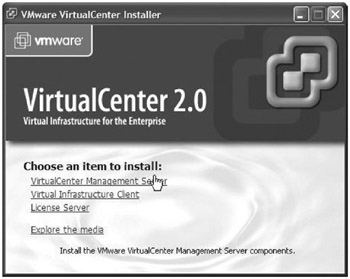
Once the database is configured, run the VirtualCenter executable from the VirtualCenter installation media.
At the VMware VirtualCenter Installer click VirtualCenter Management Server.
Figure 2.2
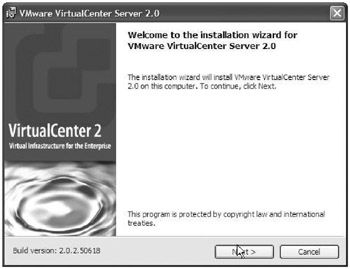
At the VMware VirtualCenter Server 2.0 screen choose Next.
Figure 2.3
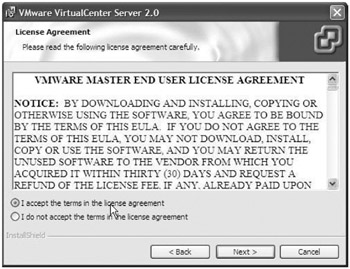
At the VMware VirtualCenter Server 2.0 License Agreement screen accept the license agreement and click Next.
Figure 2.4
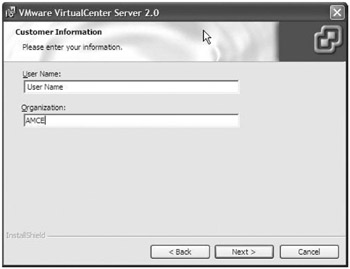
At the Customer Information screen fill in the user information and click Next.
Figure 2.5
At the Destination Folder screen you can leave it as the default, or you can choose an alternate...