How to Cheat at Configuring VmWare ESX Server

Chapter 4: Physical to Virtual Migrations (P2V)

Introduction

VMware Converter offers a user friendly way to take your physical servers and simply migrate that to your VMware ESX environment. This product was originally known and VMware P2V which stands for Physical to Virtual. Without VMware takes a duplicate image of your physical servers and converts them to a virtual machine which prevents the need to reinstall operating systems and applications to move your applications into the VMware ESX environment. Once moved to the VMware ESX environment the virtual machine the can retain its original server name and active directory sid. The virtual machine is essentially the exact same machine with the only difference being that it now sees VMware virtual hardware rather than its old physical hardware.

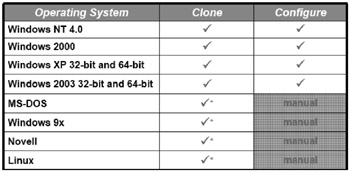
Table 4.1: Supported Operating Systems

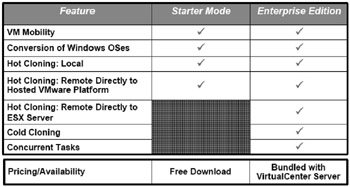
Table 4.2: VMware Converter editions and features

Installing VMware Converter

  1. First you will need to download the VMware converter software, which can be found at www.vmware.com/download.

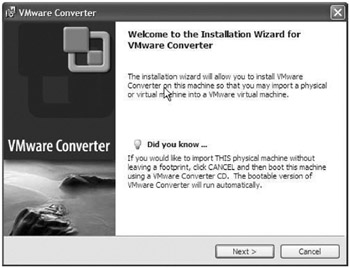
  2. At the Welcome to the Installation Wizard for VMware Converter screen click Next to continue. (See Figure 4.1.)


    Figure 4.1: Welcome Screen

  3. At the End-User License Agreement screen select I accept the terms in the License Agreement option and click Next to continue.

    Tip

    It is advisable to reboot a source machine and check the event logs before migrating a physical server to a virtual machine. This will give you a good baseline of the current system state so you can be aware of any potential problems before virtualizing the system.

UNLIMITED FREE
ACCESS
TO THE WORLD'S BEST IDEAS

SUBMIT
Already a GlobalSpec user? Log in.

This is embarrasing...

An error occurred while processing the form. Please try again in a few minutes.

Customize Your GlobalSpec Experience

Category: Data Recovery Services
Finish!
Privacy Policy

This is embarrasing...

An error occurred while processing the form. Please try again in a few minutes.