Tony Redmond's Microsoft Exchange Server 2003 with SP1

Chapter 11: Managing Exchange Servers

Now that we know how to manage users and all the data that they produce, we need to move on to a discussion about how best to manage server-wide data, implement policies and procedures, and conduct daily operations. In this chapter, we look at essential management operations, such as backup and restore, as well as some of the more esoteric operations, such as message tracking.

11.1 System Policies

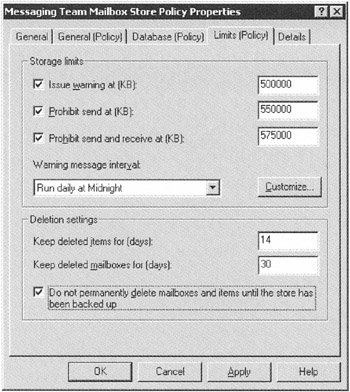
Exchange defines a policy as a collection of configuration settings that an administrator can apply to one or more Exchange configuration objects of the same class. In practical terms, this means that you can define a policy and then apply it to every object of a certain class throughout the organization. For example, you could decide that the mailbox quota for users allocated to a special Mailbox Store should be set to certain values, as shown in Figure 11.1. Once created, Exchange applies the policy for all the users whose mailboxes are in the Store by adding the policy to the properties of the Store. You can also apply system policies to Public Stores, where the policies cover topics such as replication and full-text indexing.


Figure 11.1: Creating a policy for storage limits.

Before you can create a system policy, you have to create a System Policies container for an administrative group. You do not have to have this container present in every administrative group, since it is quite feasible to create policies centrally and then deploy them to servers in different...

UNLIMITED FREE
ACCESS
TO THE WORLD'S BEST IDEAS

SUBMIT
Already a GlobalSpec user? Log in.

This is embarrasing...

An error occurred while processing the form. Please try again in a few minutes.

Customize Your GlobalSpec Experience

Category: Mailboxes
Finish!
Privacy Policy

This is embarrasing...

An error occurred while processing the form. Please try again in a few minutes.