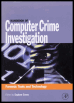
Handbook of Computer Crime Investigation: Forensic Tools and Technology
John Patzakis
When EnCase by Guidance Software first appeared on the computer forensics scene in 1998, many never imagined that the product would become the leading forensic tool by early 2000. At that time, most of the early examiners performed the bulk of their examinations from the DOS command prompt in a process that mandated proficiency in crafting hundreds of arcane DOS commands and switches. The early pioneers of computer forensics believed that examinations should never take place in a Windows environment, as Windows routinely alters data and writes to the hard drive whenever it is used.
However, EnCase does not operate on the original evidence or restored drives. Instead, EnCase directly mounts the bit-stream forensic images as read-only virtual drives. EnCase, not the operating system, then reconstructs the file system of the acquired drive by reading the logical data on the forensic image, thus allowing the examiner to view, sort and analyze the data through a Windows graphic user interface in a completely non-invasive manner. Importantly, dozens of analysis tools and functions are integrated into one application, further streamlining the investigation process and allowing the examiner to multitask, run several concurrent threads, and build a case. Additionally, several Evidence Files or drive images can be included and concurrently analyzed in one case.
'The early debate over EnCase versus the command line is actually nothing new to the computer field,' notes Guidance Software CEO and head developer Shawn McCreight. 'In just one example, we saw the same thing with...