Microsoft Exchange 2000 Infrastructure Design: Co-existence, Migration, and Connectivity

A book that bridges the gap between running the Exchange 2000 setup program and having a working system.
 TABLE OF CONTENTS
 This chapter describes some of the most useful tools that can be used day-to-day in your Exchange 2000 environment.
If users are reporting missing e-mail or you suspect that there is a problem with message delivery or routing, use Message Tracking Center to determine whether a message is waiting in a queue or whether it has been sent. Message Tracking Center allows you to reference the message tracking logs stored on each server and view the history of sent messages. If the message does not appear in a tracking log, check the message queues, using the queue viewer tool, to see if the message is waiting in a queue for an available connection or for routing information before it can be delivered.
Message Tracking Center is located under the tools icon in Exchange System Manager. Once you expand the tools container, you can right-click on Message Tracking Center to begin tracking a message, as shown in Figure 12.1.
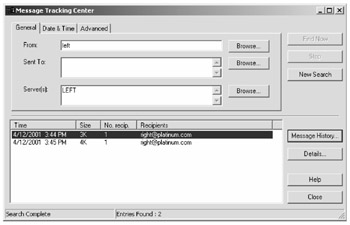
Once you've searched for the messages that meet your selection criteria, you can select an individual message and choose Message History to see the processing that has taken place on the specific message, as shown in Figure 12.2.
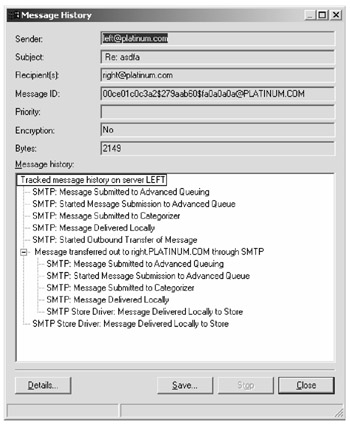
As you can see, the tracking log allows you not only to see where and when a message has been delivered, but it also shows how each component operates on a message. In the example in Figure...