Introduction to MATLAB & SIMULINK: A Project Approach, Third Edition
1.2: ELEMENTARY MATLAB CONSTRUCTS

1.2 ELEMENTARY MATLAB CONSTRUCTS

Starting with the basic data structure of the numerical field, the most important elementary constructs and operations of MATLAB (in the author's opinion) will be presented here. Initially, MATLAB will only be used interactively. It will be shown how (numerical) calculations are carried out interactively and how the results of these calculations can be represented graphically and checked.

The elementary MATLAB operations can be divided roughly into five classes:

  • Arithmetic operations

  • Logical operations

  • Mathematical functions

  • Graphical functions

  • I/O operations (data transfer)

In essence, all these operations involve operations on matrices and vectors. These in turn are kept as variables which, with very few restrictions, can be defined freely in the MATLAB command interface.

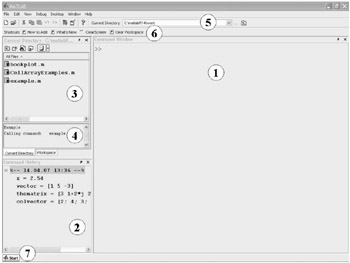
The MATLAB command interface shows up at the start of MATLAB in the form shown in Fig. 1.1 or something similar. [2]


Figure 1.1: The MATLAB command interface.

The main elements of this command interface are:

  1. the command window,

  2. the command-history window,

  3. the current directory window or (hidden in this view) the workspace (variable window),

  4. the file information window,

  5. the icon toolbar with the choice menu for the current directory,

  6. the shortcut toolbar, and

  7. the start button.

The function of the individual elements will be discussed later, in the relevant sections. At present, only the command window, which displays the most important user interface during interactive operation, is of significance.

In the command window (1) MATLAB awaits the user's commands, which are to be directly interpreted and executed by MATLAB...

UNLIMITED FREE
ACCESS
TO THE WORLD'S BEST IDEAS

SUBMIT
Already a GlobalSpec user? Log in.

This is embarrasing...

An error occurred while processing the form. Please try again in a few minutes.

Customize Your GlobalSpec Experience

Category: Robot Software
Finish!
Privacy Policy

This is embarrasing...

An error occurred while processing the form. Please try again in a few minutes.