Introduction to MATLAB & SIMULINK: A Project Approach, Third Edition

Chapter 4: Solutions to the Problems

OVERVIEW

Solutions to the problems formulated in this book are given in this chapter. Readers should work out these problems on a computer as they read the book. Most of the solutions are also given in the form of MATLAB m-files or Simulink systems in the software accompanying this book. The names of the appropriate m- or mdl-files are given with each solution. An indication of which call is to be used for the solutions in MATLAB can (in the case of m-files) be read out by entering help . The relevant comments for Simulink systems appear in the system window.

You should make sure that the installed MATLAB search path (see Section 1.2.9) contains the folder with the files from the accompanying software.

4.1 SOLUTIONS TO THE MATLAB PROBLEMS

Problem 1

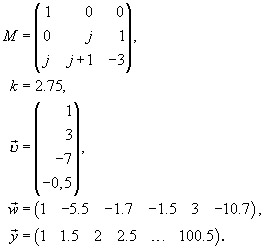
Define the following matrices or vectors according to MATLAB and classify the corresponding variables:


Problem 2

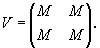
  1. Expand the matrix M to a 6 6 matrix V of the form


  2. Delete row 2 and column 3 from the matrix V (reduced matrix V23).

  3. Create a new vector z4 from row 4 of the matrix V.

  4. Modify the entry V(4, 2) in the matrix V to j + 5.

Problem 3

From the vector


construct a matrix N consisting of 6 columns where each contain .

Problem 4

Check whether the row vector of Problem 3 can be joined onto the matrix N that was...

UNLIMITED FREE
ACCESS
TO THE WORLD'S BEST IDEAS

SUBMIT
Already a GlobalSpec user? Log in.

This is embarrasing...

An error occurred while processing the form. Please try again in a few minutes.

Customize Your GlobalSpec Experience

Category: Commercial Matrix Displays
Finish!
Privacy Policy

This is embarrasing...

An error occurred while processing the form. Please try again in a few minutes.