1.5 MATLAB HELP
The help command help has often been referred to in the preceding sections. If the name of a command, of a group of commands, or of an entire toolbox is known, then the statement help can be entered in the command window to display the desired information in the command window.
This information can also be obtained by selecting the menu command help - MATLAB help and entering the corresponding command or command group in the search window under the index or search tab. This is especially useful when the precise name of the command is not known, since the search function permits a search for keywords in the full text of the MATLAB handbooks. At the same time, logical operations are possible. Search terms can be joined by the conjunctions AND, OR, and NOT.
Fig. 1.24 shows the help window after entry of graphics AND axis AND label NOT properties in the field search for: of the search tab.
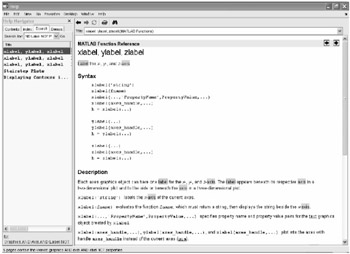 Figure 1.24: The MATLAB help window after a search operation.
 Obviously the label functions xlabel, ylabel, and zlabel for MATLAB graphics introduced in Section 1.2.5 will be found with this search.
Also, in the case of a keyword search, there is, as usual, another possibility in the form of a MATLAB command, which should not be omitted here. With the command
>> lookfor 'xlabel'TEXLABEL Produces the TeX format from a character string.XLABEL X-axis label.IMTEXT...

 TABLE OF CONTENTS