Programming Itanium-based Systems: Developing High Performance Applications for Intel's New Architecture

Chapter 6 introduced the Itanium development tools and showed how to use the compiler and linker to create an executable Itanium application. Once an executable file is created, its correctness must be verified. That is, it must be completely tested and debugged before it can be released. This chapter examines how applications are tested and debugged using the Intel GUI debugger, edb, a member of the Itanium software development tools set.
The enhanced debugger (edb) is a source-level, symbolic debugger used for developing and testing C, C++, and Fortran applications. The debugger supports code written for both Itanium and IA-32 architecture processors. In this chapter, we will focus on the use of edb for debugging Itanium applications.
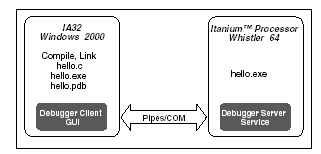
Figure 7.1 illustrates the Itanium application debug environment. Like the compiler, the debugger is run in the Microsoft Windows 2000 environment on the client PC. For example, the source code, hello.c, its executable file, hello.exe, and its program database file, hello.pdb, are located on the client. The .pdb file holds information needed for debugging source level code.
The edb runs the Itanium application remotely on the Itanium platform. In order to do that, the executable file must also exist on the Itanium platform. Therefore, the application is run in the WIN64 2000 environment, but is controlled by commands entered at the client PC. In this way, you can see that all Itanium application debugging is done remotely.
This debugger...