Multimedia Networking: From Theory to Practice

Chapter 12: Implementations of Multimedia Networking

12.1 Speech and Audio Compression Module

This speech and audio compression module, which (as well as all the software associated with this chapter) can be downloaded from http://allison.ee.washington.edu/index_files/page565.htm, will allow you to perform speech and audio compression. There is a restriction on the input speech files. When we select a speech file for compression, the file must be *.wav. After compression we can either detect the effect on different tones or discern the increasing improvement in speech compression through distinct encoding methods.

12.1.1 Introducing the graphical user interface (GUI)

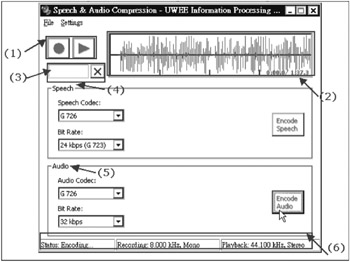
  1. The Record and Play buttons allow us to record or play our speech signals and audio files.

  2. The waveform window shows the signal waveform on which we shall be operating.

  3. The Progress bar informs us of the compressing progress by the filling of the bar. If we want to stop encoding, we just push the Stop button. (This will only be visible during encoding.)

  4. Using the speech codec block we can choose our speech codec, bitrate, and other options we want to use during encoding.

  5. Using the audio codec block we can choose our audio codec, bitrate, and other options we want, and then begin encoding from this block.

  6. The Status bar shows the recording sampling rate and the playback sampling rate.

12.1.2 Quick start guide

12.1.2.1 Speech codecs

  1. Step 1 Plug the headphones into your computer.

  2. Step 2 Start Sound Recorder from the Start menu.

  3. Step 3 Now record some speech,...

UNLIMITED FREE
ACCESS
TO THE WORLD'S BEST IDEAS

SUBMIT
Already a GlobalSpec user? Log in.

This is embarrasing...

An error occurred while processing the form. Please try again in a few minutes.

Customize Your GlobalSpec Experience

Category: Codec ICs
Finish!
Privacy Policy

This is embarrasing...

An error occurred while processing the form. Please try again in a few minutes.