Nokia Network Security Solutions Handbook
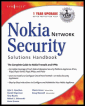
Your complete guide to Nokia IP network security solutions.
 TABLE OF CONTENTS
 This section is dedicated to upgrading your FireWall-1 software on your NSP. We'll start by assuming that you are running FireWall-1 4.1 SP-6 on IPSO 3.4.1 FCS10 or later. If you are on a prior version of FireWall-1 4.1, you should start by upgrading your IPSO to the latest 3.4.1 and then upgrading to SP-6. If you are on FireWall-1 4.0, you need to upgrade to 4.1 before upgrading to NG. Don't get overzealous; be careful and take small steps, and you will be better off in the long run. You can upgrade from 4.1 SP-6 to NG FP1, FP2, or FP3. We recommend that you first go to the FP2 bundle (which actually installs the FP1 packages as well) before moving on to newer Feature Packs.
The first thing you should do once you are on 4.1 SP-6 is to run your configuration through one of the upgrade verification tools that Check Point provides. This might catch errors that could cause the upgrade to fail or cause the resulting configuration to be unusable after the upgrade. There is a tarball named upgrade_verifiers_NG_FP2_nokia.tgz for IPSO 3.4.x and 3.5 and associated release notes. You should only run this on your Nokia if you have a management server installed. This script checks the $FWDIR/conf directory on your management console. Download this bundle to your Nokia management server and gunzip and untar it into its own directory. You can obtain this file from www.checkpoint.com/techsupport/downloadsng/utilities.html#upgrade_verify:
If the upgrade_verifiers_NG_FP2_Nokia.tgz file is in...