Planning Using Primavera Project Planner P3, Version 3.1: Including Updated Workshops
22 Object Linking and Embedding

Overview

P3 supports OLE, Object Linking and Embedding.

You may place an object such as a table or graph from Excel, a picture or text in the Bar Chart area using the Paste function.

A Linked object is linked to the original file, then any changes to the original file are reflected in the Object displayed in the Bar Chart area.

An object becomes part of the P3 file when it is Embedded in the Bar Chart area and may only be edited by opening the P3 file and editing the Object from P3.

The commands associated with objects covered in this chapter are:

  • View, Attachment Tools

  • View, Objects

  • Insert, Object

  • Edit, Paste

  • Edit, Find Objects

  • Edit, Object

  • Edit, Paste Link and

  • Edit, Links.

22.1 View, Attachment Tools

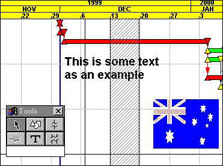
Select View, Attachment Tools to display the tools form. This allows you to place objects on the Bar Chart shown in the example below:

  • An object, the Australian Flag, is placed by clicking on the icon.

  • A vertical line, running through the a of an by clicking on the icon.

  • A vertical shaded area, by clicking on the icon.

  • Some text, by clicking on the icon.

These objects may be selected by clicking on the icon and selecting the object to be edited or deleted.

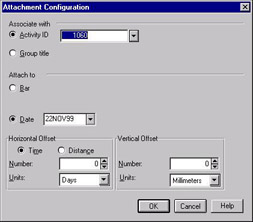
Clicking on the opens the Attachment Configuration form. This is used to attach an object to an Activity ID or Group tiles.

22.2 View, Objects

This option either displays or...

UNLIMITED FREE
ACCESS
TO THE WORLD'S BEST IDEAS

SUBMIT
Already a GlobalSpec user? Log in.

This is embarrasing...

An error occurred while processing the form. Please try again in a few minutes.

Customize Your GlobalSpec Experience

Category: LiDAR Sensors
Finish!
Privacy Policy

This is embarrasing...

An error occurred while processing the form. Please try again in a few minutes.