Programming with Quartz: 2D and PDF Graphics in Mac OS X

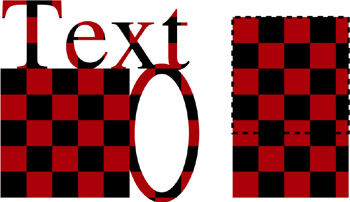
Take a look at Figure 15.2 to see what it looks like to draw with a simple colored pattern. This figure, which is the result of executing the code in Listing 15.1, demonstrates some of the features of drawing with patterns. On the left side of the figure is a filled rectangle, a stroked ellipse, and some text that is painted with a pattern. On the right side of the figure are two rectangles drawn with a pattern. These rectangles overlap; one of the rectangles is stroked with a dashed line so that you can see its boundary.
The pattern cell in this example consists of two red and two black rectangles, arranged in a 2 2 grid. Each rectangle is 1 unit on a side, the overall size of the grid is 2 units on a side. The grid is that of a small piece of a red and black checkerboard like you might see in a checkers game.
Listing 15.1 consists of the routine doRedBlackCheckerboard and two supporting routines: createRedBlackCheckerBoardPattern, which creates the CGPatternRef corresponding to the checkerboard pattern, and myDrawRedBlackCheckerBoard-Pattern, which draws the checkerboard pattern cell. The routine doRedBlack-Checkerboard first calls the routine createRedBlackCheckerBoardPattern to make a CGPattern object that corresponds to the checkerboard pattern. It passes an affine transform that createRedBlackCheckerBoardPattern uses as the patternMatrix for the pattern it creates. By...