Programming with Quartz: 2D and PDF Graphics in Mac OS X

Quartz capabilities such as alpha compositing and shadows allow for interesting results without a lot of effort. So far you've seen these effects applied to the drawing of individual graphic objects. But what if you want to apply a shadow or perform alpha compositing to a group of objects as if it were a single graphic primitive? Quartz makes this possible through the use of transparency layers. Transparency layers group a set of drawing operations and then operate on that group as a whole. Sometimes transparency layers are referred to as transparency groups.
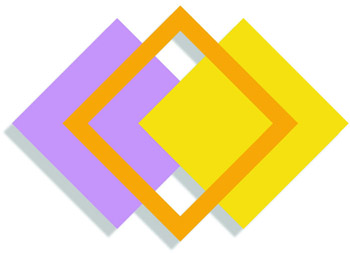
You can see one effect possible with transparency layers by comparing Figure 15.11 with Figure 15.12. Note that in Figure 15.11, each individual graphic primitive has its own shadow. But the graphic in Figure 15.12 is shadowed as a single object. The rectangles don't cast a shadow over those underneath, but instead the entire graphic has a single shadow. The shadow cast is a complex shape and is only drawn at the border of the graphic as a whole.
You use the functions CGContextBeginTransparencyLayer and CGContextEnd-TransparencyLayer to delineate a transparency layer. You first call CGContext-BeginTransparencyLayer to indicate the start of the transparency layer this records the current value of the clipping area, the global alpha, the current shadow, and the blend mode present in the graphics state and resets them to their default...