Programming with Quartz: 2D and PDF Graphics in Mac OS X

Alpha Compositing and Transparency Layers

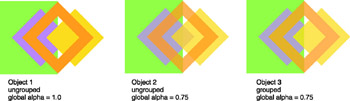
Besides applying shadows to a group of objects, you can use transparency layers to apply alpha compositing effects to a grouped object, rather than to the individual objects within that group. Take a look at Figure 15.14 to see how you can use alpha compositing in this way. An opaque green rectangle is drawn underneath the left half of each object in the figure. Object 1 in the figure is a "complex shape" painted with fully opaque alpha on top of the background. The complex shape is the same set of colored rectangles as Figure 15.11 (page 521) and Figure 15.12 (page 522). Because the colored rectangles are fully opaque, they completely obscure the portions of the background they cover. Object 2 is the same shape drawn with a global alpha value of 75 percent on top of the same background. In Object 2, the individual components of the shape are each visible, since they are not composited as a single object but rather one at a time. Object 3 in the figure is the shape composited as a single object on top of the background. This last result is achieved by using transparency layers to group the drawing of the colored rectangles.


Figure 15.14: Compositing per object versus group

Figure 15.14 is the result of executing the code in Listing 15.11. The doLayer-Compositing routine starts by drawing a green background for Object 1 and draws the colored rectangles using the drawColoredLogo routine...

UNLIMITED FREE
ACCESS
TO THE WORLD'S BEST IDEAS

SUBMIT
Already a GlobalSpec user? Log in.

This is embarrasing...

An error occurred while processing the form. Please try again in a few minutes.

Customize Your GlobalSpec Experience

Category: Color Meters and Appearance Instruments
Finish!
Privacy Policy

This is embarrasing...

An error occurred while processing the form. Please try again in a few minutes.