Setting Up a Web Server

An introduction to not only Web servers, but the entire infrastructure needed to create and maintain a business presence on the Internet.
 TABLE OF CONTENTS
 As the Web server administrator, one of the most useful servers that you can install is the ability to support Telnet sessions. Telnet is normally used to allow remote login to a server and lets the user enter commands, move and copy files and run applications from any distant location via a standard Internet link.
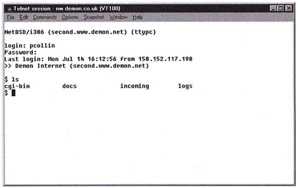
The Telnet server works using port 23 of the TCP/IP protocol stack and redirects information from the server over the remote link to the Telnet client software. The client software normally emulates either a VT100 or IBM 3270 terminal to allow plain text and simple formatting commands to pass over the link. Once the Telnet server is running, it listens for Telnet requests arriving on port 23 and wakes up once it detects a request to start a session.
As with many of the other servers described in this book, there are considerable differences between the servers offered with different Web server packages. Unix-based servers will normally use a standard freeware telnetd (Telnet daemon program) whereas Windows-based Web server applications normally include their own server software.
Once the server software is running, it will accept Telnet session requests from any user, but will only establish a session with an authorized user who enters a correct user name and password (defined in the Web server's main user file). If you have setup a firewall to protect your server from direct requests, the usual method of still allowing Telnet sessions...