Setting Up a Web Server

An introduction to not only Web servers, but the entire infrastructure needed to create and maintain a business presence on the Internet.
 TABLE OF CONTENTS
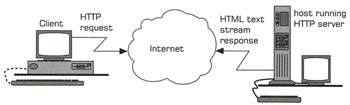
 The World Wide Web has provided the real impetus behind the surge in the popularity of the Internet. However, the way that a Web server works is very simple. A client uses a Web browser to send requests to a Web server the language of these requests is called HTTP and is part of the TCP/IP protocol suite (see Chapter 3). These HTTP requests are actually plain text commands and are simple in format. The Web server is an application that can understand these HTTP commands and act on them (which normally means retrieving a requested Web page and returning the document to the client). The Web page is made up of HTML commands and these commands define formatted text, images, sound and hyperlinks displayed as a page on the client's Web browser.
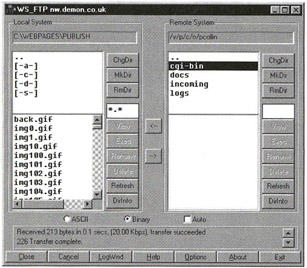
Serving up Web pages is just one application of a server on the Internet. The other applications include FTP for file transfer, e-mail, Telnet to control a remote computer, NNTP for newsgroups and more. Each of these applications uses a different protocol to communicate with a client, so file transfers are carried out using the FTP protocol (again, part of the TCP/IP protocol suite).
For this book, I am using the term "Web server" in its new, more general meaning that refers to a server on the Internet that can provide Web pages, e-mail, file...