Managing Cisco Network Security
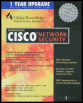
Manage the security of Cisco-based networks with the strategies detailed in this book.
 TABLE OF CONTENTS
 When you need to administer a large network, you will have one or more firewalls on the border of your network, connecting either to the Internet or to a customer s company with whom you need to communicate. The firewalls installed on your network will play an important role in protecting against intruders from outside your network. It is critical that you manage them effectively and efficiently.
Cisco has developed PIX Firewall Manager for their PIX Firewall product range to do just this. The rules for accessing your network are defined at a central point and can be distributed to multiple firewalls on the border of your network.
When you have one or more PIX Firewalls installed on your network protecting the resources inside your network against potential intrusion from outside, you can use PIX Firewall Manager to administer and manage the PIX Firewall device security policy. PIX Firewall Manager can manage one or more PIX Firewalls from any host with a Graphical User Interface (GUI). The most basic use of PIX Firewall Manager is to add, remove, and change the security policy and rules for all communication between your network and the outside world.
PIX Firewall Manager, or PFM, can be installed on a Microsoft Windows NT Server or Workstation and includes two components:
After the installation of the PFM software on your server is complete, the new service added to the Windows NT server called PIX Firewall Manager...