AutoCAD 2002 Inside & Out, Second Edition

For those of you faced with the arduous tasks of dimensioning your drawings, you'll be happy to know that AutoCAD 2002 has some awesome dimensioning features certain to eliminate much of the tedium. They've also granted a few more dimension variable wishes for those who still can't get dimensions to obey their every desire. In this chapter, I cover many of the changes made to the dimension world.
First and foremost, one of the absolutely best dimensioning features is the stunning qdim command (quick dimension). This former Express tool always receives oohs and ahs from audiences when I'm out preaching the AutoCAD gospel. Another Kurt Chase programming special, Qdim allows you to create a series of dimensions at one time, and although I think you'll find its strong point lies in baseline or continuous dimensioning, it also does a mean job at knocking out multiple dimensions on circles and arcs. I'll start with a simple example and then explain each option in more detail.
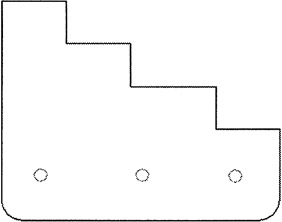
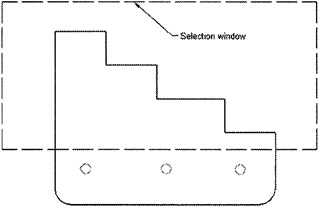
Figure 17.1 shows a simple drawing containing a few circles and arcs. After entering the qdim command, I'll start with some baseline dimensioning. Using a simple crossing window, as shown in Figure 17.2, I've selected the lines at the top of the drawing to dimension.
<span class="fixed">Command: QDIM</span><span class="fixed">Select geometry to dimension:</span> Select objects to dimension<span class="fixed">Select geometry to dimension:</span><span class="fixed">Specify dimension...