Hands-On Guide to Windows Media

Chapter 9 focused on planning and preparing for a live webcast, whether you're webcasting from a studio or on location. No matter the source of your live signal, you need to encode that signal for distribution over the Internet or your company intranet. This chapter discusses the streaming media technology both types of webcasting have in common, which is the Windows Media Encoder. You'll learn:
The two types of live stream distribution
How to configure Windows Media Encoder for live streaming
How to configure Windows Media Services for live streaming
An elegant way to keep your viewers with you while you cope with a disaster
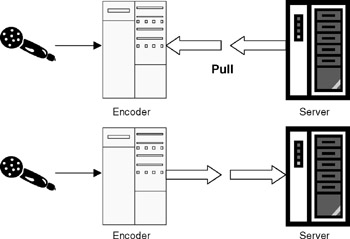
Before you learn the details of setting up an encoder and server for live streaming, you need to know about the two options for connecting an encoded stream with a server. The two options are pull distribution and push distribution, as illustrated in Figure 10-1.
The most common method of connecting an encoder with a server is pull, because it works fine with most network situations. With this method, the server establishes the connection with the encoder and distributes the streams to players. You configure pull distribution in the Windows Media Server Administrator, as discussed in following sections. (All examples in this chapter use the pull method.)
Here are a few scenarios...