Juniper Networks Secure Access SSL VPN Configuration Guide

At the core of the SSL VPN, lies its OS. This, in many ways, is the kernel to the hardware and other I/O, and also keeps all the files and configurations in order. Dual partitions, hardware acceleration, a custom boot loader, and other options are available to fine-tune the OS. These controls are generally global settings for the system to use, and unless otherwise noted, also apply to Virtual Systems since they all share a common hardware subsystem.
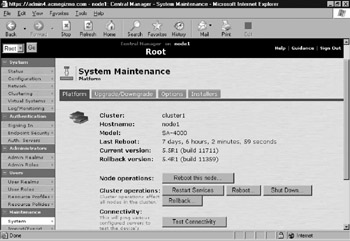
The system maintenance menu includes the following components
Platform Information, routine maintenance
Upgrade/downgrade Manages the boot partitions
Options Global system parameters, including hardware settings
Installers Downloadable executables for client agent components
Figure 10.1 shows an example of the System Maintenance Menu.
The Platform menu provides you with a quick overview of the current state of the system. This gives Administrators a quick overview of what OS the system has booted, and what fallback OSes are available. This includes:
Cluster Name Used when configured to be part of a cluster
Hostname Used for Java Applet Upload and Secure Meeting functions
Model # Based on the hardware profile and license key
Last Reboot System uptime
Current and Rollback Versions The IVE uses the concept of a rollback partition. This partition is simply the previous IVE operating system and configuration (before an upgrade took place). If something is wrong with the new version, or there was some...