Monitoring and Managing Microsoft Exchange Server 2003
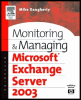
This authoritative book teaches IT professionals responsible for Exchange messaging systems how to efficiently manage the program's many and complex system capabilities and features.
 TABLE OF CONTENTS
 Exchange administrators are those people who create and maintain user mailbox entries, create address list entries for external contacts, set message size limits, set Information Store limits, establish mailbox ownership, and perform other duties. Usually, only one user has access to a mailbox. However, an administrator can set mailbox permissions to allow more than one person to access the information in a mailbox. This is most commonly done to allow administrative assistants to access their managers mailboxes or to allow multiple people to access group or functional mailboxes.
Your corporate administrative model has minimal impact on the proceduresyou use to manage recipients. The same procedures can be used by a centralized administrative group or can be delegated to regional or departmental administrative groups. Because you cannot create an Exchange account for a user unless that user also has a Windows account, it is quite common for the same person to be responsible for managing both Windows accounts and Exchange accounts. If different people perform these tasks, then there needs to be some level of group coordination.
Windows and Exchange support several types of recipients:
Mailbox-enabled users
Mail-enabled users
Mail-enabled contacts
Mail-enabled groups
Mail-enabled public folders
A mailbox-enabled user is a Windows user who has a mailbox in an Exchange message store. A mailbox-enabled user has an electronic mail (e-mail) address and both sends and receives e-mail using Exchange.
A mail-enabled user is a Windows user who does not have an Exchange mailbox but does have an e-mail address. For...