Six Sigma Best Practices: A Guide To Business Process Excellence For Diverse Industries
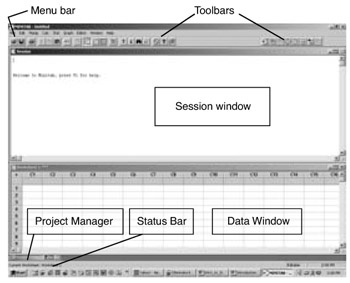
This section introduces the MINITAB tool used in this book. MINITAB is one of several statistical software-type packages that are available in the marketplace. Because MINITAB is utilized in this book for statistical analysis, only introductory information is provided. Advanced information is available in books on MINITAB. Once the MINITAB tool is opened, an initial screen opens with the initial windows of MINITAB (Figure 3.15).
Initial Windows
The Session window displays text output such as tables of statistics.
The Data window is where column data for each work sheet are entered, edited, and viewed. This is not a spreadsheet. Columns define variables. Variable names can be listed above the first row. There can be more than one data window.
Graph windows are not displayed in Figure 3.15. These windows display graphs also. Up to 100 graph windows can be open at a time.
Menus and Tools
The Menu Bar is where commands are chosen.
The Standard Toolbar displays buttons for commonly used functions. The buttons change depending on which MINITAB window is active.
The Project Manager Toolbar provides shortcuts to Project Manager folders.
The S tatus Bar displays explanatory text whenever the cursor points to a menu item or Toolbar button.
Shortcut Menus appear when right-clicking on any window in MINITAB or on any folder in Project Manager. The menu displays the most commonly used functions for that window or folder.
After clicking...