Sniffer Pro: Network Optimization & Troubleshooting Handbook
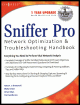
Provides all-inclusive coverage of Sniffer Pro LAN, including the tools accessible on networks.
 TABLE OF CONTENTS
 Always try to see if poor network performance is affecting one user, several users, or the entire network. Isolate your problems and nail them down one at a time, if possible.
Always view network documentation and topology maps, if available, to try to find out whether the initial design itself is causing performance issues. You need not snap your Sniffer Pro analyzer into the network immediately to formulate a clue on where the problems lie; detailed topology maps speak for themselves.
When you are initially analyzing performance on a network, it is important to interview the staff (both users and administrators) to get a solid picture of network health from a maintenance performed point of view. Ask administrators about changes made to the network recently; find out if things had gotten bad at a specific time, and use the information you gather as part of your analysis. Often changes made to a network result in poor performance, and the staff might be unaware of the cause.
Always involve your telco or ISP in your overall analysis. Ask for service-level agreements (SLAs) if they re available and bandwidth utilization charts if they keep them. This information will help you get a bigger picture of possible performance problems.
The Sniffer Pro Dashboard is your tool for real-time network analysis. You can use it to monitor performance of the network segment to which Sniffer Pro is attached and establish baselining and trending.