Sniffer Pro: Network Optimization & Troubleshooting Handbook
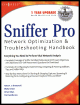
Provides all-inclusive coverage of Sniffer Pro LAN, including the tools accessible on networks.
 TABLE OF CONTENTS
 Now that you have seen how to monitor applications and network performance with the Sniffer Pro, let s discuss the actual capturing of data in depth. Until now, you were merely going through the motions of pressing the Start button on the Sniffer toolbar and capturing data, stopping the process, and looking at the data. This chapter covers details about capturing data and saving it for later analysis. You need to know how to save and archive capture files for logging and/or future baselining. What if you need to download a capture from the Internet to see what a certain traffic pattern looks like so that you know what you are looking for on your network? What if an administrator sends you a capture file for you to analyze from your company s remote office location? All this is covered in this chapter as we explain how to capture network data for analysis purposes. After discussing the specifics of capturing data, we also cover in detail the capture and analysis of Address Resolution Protocol (ARP), Internet Control Message Protocol (ICMP), Transmission Control Protocol (TCP), and User Datagram Protocol (UDP).
As you already know, Sniffer Pro is a great tool to help you capture traffic. Network problems are not a rare thing for a network administrator to experience. Unfortunately, broadcast storms, slow responses, or network attacks happen quite frequently. You have to choose the best way to identify each problem, analyze it, and sort it out. Using Sniffer Pro to...