Adobe Acrobat and PDF for Architecture, Engineering, and Construction
Chapter 5: Creating Other Package Components

Rather than opening programs and converting files to PDF from their native applications, you can instead create package components as PDF files within Acrobat in a number of ways. The method you use depends both on your intended use of the files and your preferred workflow.

In this Chapter

You can create package components as PDF files from other source documents. In this chapter you learn how to:

  • Create PDF files from single or multiple documents

  • Create PDF files from a scan, and capture and test the content

  • Create PDF files from a Web page, either through Acrobat or Internet Explorer

  • Create a PDF file from captured content, either in the form of a snapshot or from clipboard contents.

Converting a Single Document

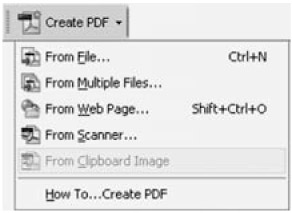
Acrobat 6 and 7 include a Create PDF task button, which contains the options for creating a PDF file within Acrobat. Click the task button to display its menu, shown in Figure 5.1, or choose File > Create PDF menu. For assistance, choose How to Create PDF from the Task button's menu to open common file creation topics in the Search pane at the right of the program window.


Figure 5.1: Use the task button's menu to choose operations

To create a PDF from a single file, choose From File from the Create PDF task button's menu. Select the file you want to convert in the Open dialog box and click Open. The file is opened in its source program and converted to PDF. Acrobat uses...

UNLIMITED FREE
ACCESS
TO THE WORLD'S BEST IDEAS

SUBMIT
Already a GlobalSpec user? Log in.

This is embarrasing...

An error occurred while processing the form. Please try again in a few minutes.

Customize Your GlobalSpec Experience

Category: Optical Character Recognition Software (OCR)
Finish!
Privacy Policy

This is embarrasing...

An error occurred while processing the form. Please try again in a few minutes.