Get Streaming!: Quick Steps to Delivering Audio and Video Online

We have to cover one more set of principles before we get to the actual encoding. Most mediaplayers behave in similar ways that every streaming media user experiences. Some of these behaviorscan be very frustrating. Fortunately, you can mitigate some of the frustration with good encodingpractices. This section explains some of the behaviors and a suggested solution.
When your end-user at home or in the next cubicle clicks a link to a streaming media file,the media player attempts to contact the streaming media server to get the stream. The player showsthis by displaying a Connecting . . . or similar message. A logo may spin or flash as well. Whenthe connection occurs, the player may then say Buffering . . . or Loading . . .. This could goon for several seconds or longer, depending on the connection speed, the network conditions, andplayer settings.
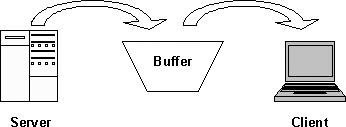
Here s what s happening. The player is filling a reservoir of random access memory (RAM) withdata from the stream. When the reservoir is filled, the audio or video starts to play. In themeantime, the player continues to receive data from the streaming server. It tries to keep thereservoir, also called the buffer, filled so that playback continueswithout interruption, creating a smooth user experience from the beginning of the clip to theend.
The unpredictability of the Internet can sabotage...