CNC Programming Handbook: A Comprehensive Guide to Practical CNC Programming, Second Edition

A programmed tool motion creates a pattern, contour or a pocket that can be rotated about a defined point by specified angle. With this control feature, there are many opportunities to make the programming process much more flexible and equally efficient. This very powerful programming feature, usually a special control option, is called the Coordinate System Rotation, or just Coordinate Rotation.
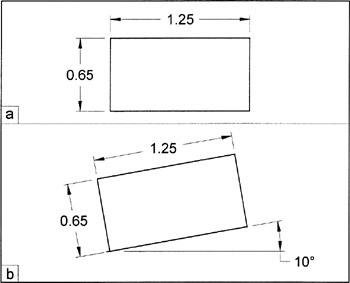
One of the most important applications of coordinate rotation is a program that is defined in an orthographic orientation but machined at an angle (as required by the drawing specifications). Orthographic mode defines only horizontal and vertical orientation, which means that the tool motion takes place parallel to the machine axes. To program orthographic mode is much simpler than calculating tool positions for many contour change points in an angular orientation. Compare the two rectangles shown in Figure 42-1.
The above figure (a) shows an orthogonal orientation of a rectangle, the figure below (b) shows the same rectangle, rotated by 10 in the counterclockwise direction. Manually, it is much easier to program the tool path for figure (a) and let the control system change it to a tool path represented in figure (b). The coordinate rotation feature is a special option and must be the part of the control system.
Mathematically, the coordinate rotation is a feature that requires only three items to define a rotated part - the center of rotation, the angle of rotation,...