Just Enough AutoCAD 2007

Whether you're new to AutoCAD or just looking for a quick refresher, this indispensable book offers practical and comprehensive guidance to help you easily and efficiently learn the basics of AutoCAD.
 TABLE OF CONTENTS
 When it comes to 3D modeling, there really isn t much you can t do with AutoCAD 2007. You can create just about any shape you can imagine in AutoCAD. Of course, the more complex the shape, the more time it will take, but AutoCAD 2007 adds a new level of freedom in 3D modeling that the older versions lacked.
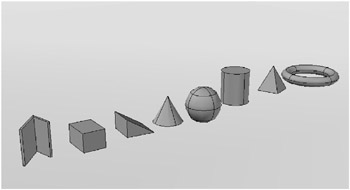
AutoCAD offers some basic shapes known as solid primitives. These are tools that let you quickly create a polysolid, box, wedge, cone, sphere, cylinder, pyramid, or torus (see Figure 6.1). You can edit these primitives to form other more complex shapes. Other tools allow you to create free-form curves from 2D objects such as lines, arcs, and splines, as shown in Figure 6.2. A Helix tool helps you create spiral shapes such as screw threads or parking garage ramps.

Most of this book is devoted to showing you how to work in what is called the AutoCAD classic workspace. This classic workspace is basically a 2D drawing environment, though you can certainly work in 3D as well.
AutoCAD 2007 offers something called the 3D modeling workspace, which gives you a set of tools to help ease your way into 3D modeling. This 3D modeling workspace gives AutoCAD a different appearance (see Figure 6.3), but don t worry. It s still behaves in the same basic way, and the...