Just Enough AutoCAD 2007

Whether you're new to AutoCAD or just looking for a quick refresher, this indispensable book offers practical and comprehensive guidance to help you easily and efficiently learn the basics of AutoCAD.
 TABLE OF CONTENTS
 When you draw in 2D, the Z axis is fairly unimportant. By default, objects you create reside at the 0 (zero) coordinate of the Z axis. In other words, everything you draw is on the plane defined by the X and Y axes. But just as you can move and copy objects anywhere in the XY coordinate plane, you can also move and copy them along the Z axis.
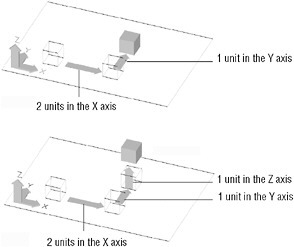
Just as you can specify exact distances in 2D drawings, you can specify locations and distances in 3D space using the @X,Y,Z notation. If you want to move something only within the XY plane, you can leave off the Z coordinate in the specification and AutoCAD assumes you want to maintain the object s current Z coordinate. To specify relative distances in 3D, you can specify the Z coordinate as needed, as in:
@2,1,1<span class="inlinemediaobject"><img alt="Image from book"> border="0"> height="13"> id="IMG_86"> src="https://images.books24x7.com/bookimages/id_17035/par3.jpg"> title=""> width="11"></span>
If you enter this at the Specify second point or [Exit/Undo]
| Note | If you only want to move an... |