It has only been a year since Autodesk last offered a new version of AutoCAD, so you might think that AutoCAD 2007 contains only minor changes. But there are many significant additions to this latest offering as well as numerous smaller changes. This appendix provides an overview of these additions, as well as new and updated commands.
AutoCAD 2007 has a completely new 3D feature set. Every aspect of 3D has been reworked to make it easier for you to create, edit, and present your ideas in 3D. Even the way you access tools for 3D modeling has been enhanced through a new tool palette called the Dashboard (see Figure D.1). Most of the major 3D features are covered in Part 4 of this book, but to get a quick rundown of these new features, you can review the following sections.
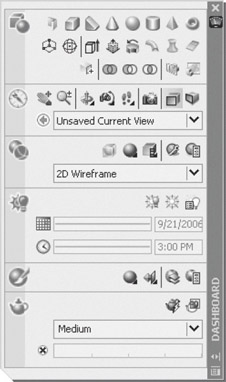 Figure D.1: The Dashboard gives you access to the new 3D functions.
 Creating 3D Objects
AutoCAD offers the basic 3D solid primitives: box, wedge, cylinder, cone, sphere, pyramid and torus. These are shapes that you can combine to build more complex forms. A new 3D solid called polysolid lets you create wall-like structures. Another command called Sweep lets you extrude a 2D shape along a path to form a tube or a non-linear extrusion. Sweep can be used in conjunction with Helix to form 3D springs or other coiled shapes. Presspull will turn a 2D shape into a 3D object using a press and pull motion as...
Copyright Wiley Publishing, Inc. 2006 under license agreement with Books24x7


 TABLE OF CONTENTS