Numerical Computing with MATLAB

Please sit down in front of a computer running MATLAB. Make sure ode23tx is in your current directory or on your MATLAB path. Start your session by entering
F = inline('0','t','y'); ode23tx(F,[0 10],1) or
F = @(t,x) 0 ; ode23tx(F,[0 10],1)
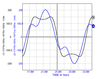
This should produce a plot of the solution of the initial value problem

The solution, of course, is a constant function, y(t) = 1.
Now you can press the up arrow key, use the left arrow key to space over to the 0, and change it to something more interesting. Here are some examples. At first, we'll change just the 0 and leave the [0 10] and 1 alone.
F Exact solution 0 1 t 1+t^2/2 y ...