USB Design by Example: A Practical Guide to Building I/O Devices, Second Edition

Chapter 14: Hubs The Inside Story

The hub is USB s unsung hero. From the outside, it looks like a simple splitter/combiner, but in this chapter we look inside a hub to appreciate what it adds to a USB system solution. We shall see that the hub plays a major role in USB s hot-plug-and-play features and in its managed power distribution. I have divided this chapter into three parts: the first presents a full-/low-speed hub (1.1 compliant); the second presents a superset of this hub, a high-/full-/low-speed hub (2.0 compliant); and I conclude with an example design of a compound device an I/O device with hub features. Note that we will not be designing a hub these are available as single-chip solutions and the USB specification gives you little design flexibility. It is more productive for you to buy a hub and to focus your energies on the I/O devices.

FULL-/LOW-SPEED HUB

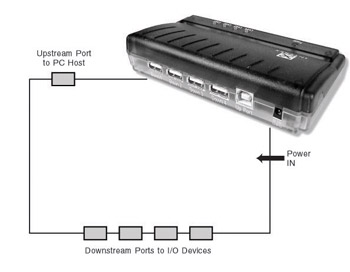
Figure 14-1 shows a representative hub product and its block diagram, and this section will reveal what really goes on under the hood.


Figure 14-1: A hub provides connectivity and system power

We can identify three major hub elements: the hub repeater, the hub controller, and the port power control (Figure 14-2).


Figure 14-2: Identifying the major elements of a hub

Hub Repeater

The upstream and downstream ports can operate at 12 or 1.5 Mbps, depending on the capabilities of the I/O device currently being accessed. If no device is attached to a downstream port, it is disabled. To better understand hub operation, let s...

UNLIMITED FREE
ACCESS
TO THE WORLD'S BEST IDEAS

SUBMIT
Already a GlobalSpec user? Log in.

This is embarrasing...

An error occurred while processing the form. Please try again in a few minutes.

Customize Your GlobalSpec Experience

Category: USB Cables
Finish!
Privacy Policy

This is embarrasing...

An error occurred while processing the form. Please try again in a few minutes.