Using IXP2400/2800 Development Tools: A Hands-on Approach to Network Processor Software Design

Appendix B: What's Next

There comes a time in the history of any project when it becomes necessary to shoot the engineers and begin production.
MacUser in 1990

The tools and example code are continually improving. This section describes some of the new features under development.

Application-Based Debugging

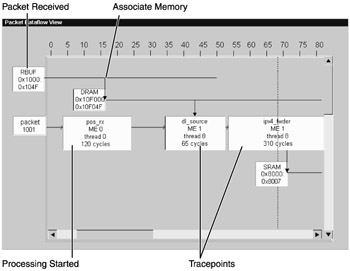
Instead of a packet event list, wouldn't it be nice to also see code task execution and data structures, like you drew in the IXP2XXX Product Line Architecture Tool? The Developer Workbench is expected to have a view for this called the packet dataflow view.

You will display the packet dataflow window by choosing the View menu from the Developer Workbench menu bar and clicking the Debug Windows / Packet Dataflow checkbox, in the same way that you did for packet list. Figure B.1 shows the concept of the packet dataflow window.


Figure B.1: Packet Dataflow Window

Like the thread history view, the packet dataflow view presents horizontal lines along a timeline. The timeline is your history size, up to the maximum limit you selected in the history options dialog. However, instead of threads, you see packet code and data flow along the horizontal lines. In addition, you can select data to be presented for references of selected memory types, such as DRAM, SRAM, and local memory.

You can scroll horizontally backward and forward in history. You can also select more than one packet and scroll vertically through packets and data structures.

By attaching tracepoints to your macros, functions, or code, you can mark the entry...

UNLIMITED FREE
ACCESS
TO THE WORLD'S BEST IDEAS

SUBMIT
Already a GlobalSpec user? Log in.

This is embarrasing...

An error occurred while processing the form. Please try again in a few minutes.

Customize Your GlobalSpec Experience

Category: Packet Generators
Finish!
Privacy Policy

This is embarrasing...

An error occurred while processing the form. Please try again in a few minutes.