Complete PCB Design Using OrCad Capture and Layout

Miscellaneous Items

The following discusses items that were not specifically demonstrated in the design examples.

Fixing bad pad exits

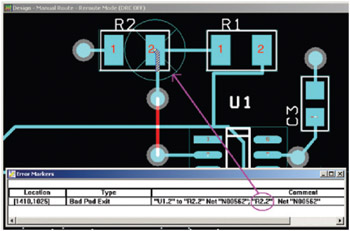
A common error is the Bad Pad Exit. If you get this error it is most likely because a trace is leaving a pad off-center or the trace has a jog in it inside a pad. Figure 9-145 shows an example of a bad pad exit (colors enhanced) and the corresponding Error Markers spreadsheet. The problem is the jog inside in R2 pad 2.


Figure 9-145: Bad Pad Exit error.

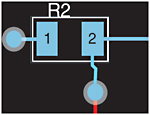
To fix a bad pad exit error use the manual Add/Edit Route Mode tool, select the trace using Ctrl + left click, then right click, and select Unroute Segment to unroute the trace from the center of the pad up to the via (make sure to get all of the segments). Manually reroute the trace starting at R2.2. Click on the net near R2.2 to start routing. Run the trace straight down, leaving the pad at its center (and perpendicular). Click the mouse just past the R2 s silk-screen outline to place a vertex. Right click and select Finish. This will force the jog to be placed outside of the pad as shown in Fig. 9-146.


Figure 9-146: Corrected pad exit.

Design cache cleanup, replace, update

Every project in Capture contains a design cache. At some point during the design process you will likely be confronted with having to modify the design cache (whether directly or...

UNLIMITED FREE
ACCESS
TO THE WORLD'S BEST IDEAS

SUBMIT
Already a GlobalSpec user? Log in.

This is embarrasing...

An error occurred while processing the form. Please try again in a few minutes.

Customize Your GlobalSpec Experience

Category: Evaporative Coolers
Finish!
Privacy Policy

This is embarrasing...

An error occurred while processing the form. Please try again in a few minutes.