Complete PCB Design Using OrCad Capture and Layout

Example 1: Dual Power Supply, Analog Design

Example 1: Dual Power Supply, Analog Design

The first example will demonstrate the basics of schematic entry in Capture, including finding and placing parts, connecting parts and using global power nets, and generating a bill of materials to assist in the design process. The example continues with PCB design in Layout and demonstrates how to specify board requirements such as trace width and spacing and figuring out how to determine which technology file to use. Finally, the example outlines a process for setting up the overall board design, how to define layers, and how to perform manual and automatic routing.

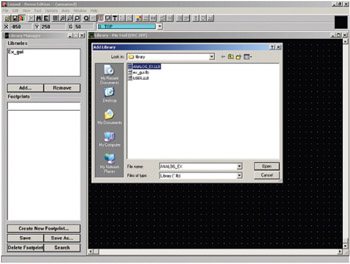
To follow the example exactly as it is presented here you will need to copy the footprint library for this example from the CD included with this book. Copy the ANALOG_EX.LLB file located in the Projects/Analog_Ex folder on the CD into the OrCAD/OrCAD_10.5_Demo/Tools/ Layout/Library folder. After you copy it into the folder you will have to let Layout know that it is there by adding it to the library list. To do so, open Layout and, from the session frame, select Library Manager from the Tools menu. In the Library Manager click the Add button located under the Libraries list box. From the Add Library dialog box select the ANALOG_ EX.LLB library, and click the Open button. ANALOG_EX should now be displayed in the Libraries list box. You can now close the Layout Library Manager window (Fig. 9-1).


Figure...

UNLIMITED FREE
ACCESS
TO THE WORLD'S BEST IDEAS

SUBMIT
Already a GlobalSpec user? Log in.

This is embarrasing...

An error occurred while processing the form. Please try again in a few minutes.

Customize Your GlobalSpec Experience

Category: Media Duplication Services
Finish!
Privacy Policy

This is embarrasing...

An error occurred while processing the form. Please try again in a few minutes.