Digital Asset Management: How to Realise the Value of Video and Image Libraries

The presentation tier is the user interface to the asset management system. As such, it makes or breaks an asset management system. The design of the presentation tier ultimately determines the usability of the system. The acceptance and whole-hearted adoption of the system will depend very much upon this usability.
As a user, you will want to undertake a wide-ranging set of tasks. These are just a few:
Edit index metadata
Manage authorisations
Search for content
Preview content
Retrieve content for editing
Archive content
Manage digital rights.
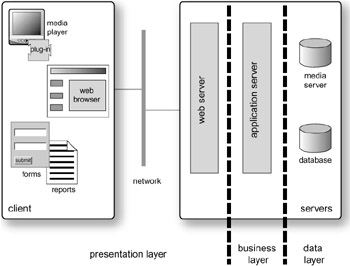
The presentation tier has two layers: the asset management server and the local client the users' PC (Figure 11.1). The server can be a normal web server, and the client can be just a standard web browser. The web server accesses the data and content through an application server, where the business logic resides.
Digital asset management is not limited to this architecture; older systems use a client-server model. The ubiquity of the World Wide Web has hastened the migration to a more web-centric design for systems, but some clients still need specialist local applications, so will link directly to the business tier. A typical example is a media logging or ingest station. This application needs to control a videotape recorder, and to encode and index the video and audio.
The advantage of separating the presentation layer from the business logic is that standard web site tools can be used. No special skills are required beyond those needed...