Focal Easy Guide to After Effects: For New Users and Professionals

Every successful program must have a compelling Killer Feature to drive its popularity. Precomping is After Effects Killer-Killer Feature the ability to use any composition in any other composition s Timeline. What really sets After Effects above the fray is the different operations of Precompositions:
Standard Nesting the Precomp layer in the parent composition performs identically to a finished pre-rendered movie clip from the source composition. ![]()
Collapsed Transformations the Precomp performs like its layers are acting as a group of layers still residing within the parent composition. All Blending Modes, 3D layers, and many effects cascade into the parent composition, affecting all layers beneath the Precomp s layer. ![]()
It s the second feature, Collapsed Transformations, that makes After Effects shine and will cause the designer much elation and hardship elation because the resulting visuals are pronounced in their boundless effect on a project s development, hardship because the increase of creative development options are, well, boundless.

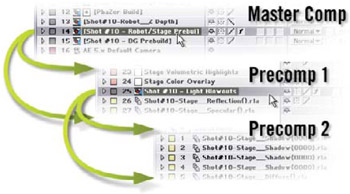
The easiest way to imagine a Precomp is to think of it as a layer of layers. The image at the bottom of the previous page shows a Master Comp with Precomp 1 as layer 14, then Precomp 1 has Precomp 2 as its layer 25.
We ll expand on this Precomp section by also discussing Looping etiquette the correct methods for creating seamless and imperceptible loop transitions.
The Precomp has so many applications that its difficult to narrow down just a few...